

Now on the App Store for iPhone and Apple Watch

How repeatable is your throw?

Understand your throw with Apple Watch. ThrowKit records the motion of every dart and shows you how repeatable your throwing motion really is.

A hand throwing a dart while wearing an Apple Watch that shows the ThrowKit recording screen
Download on the App Store Download on the App Store

Free · Requires Apple Watch

Start. Throw. See your analysis.

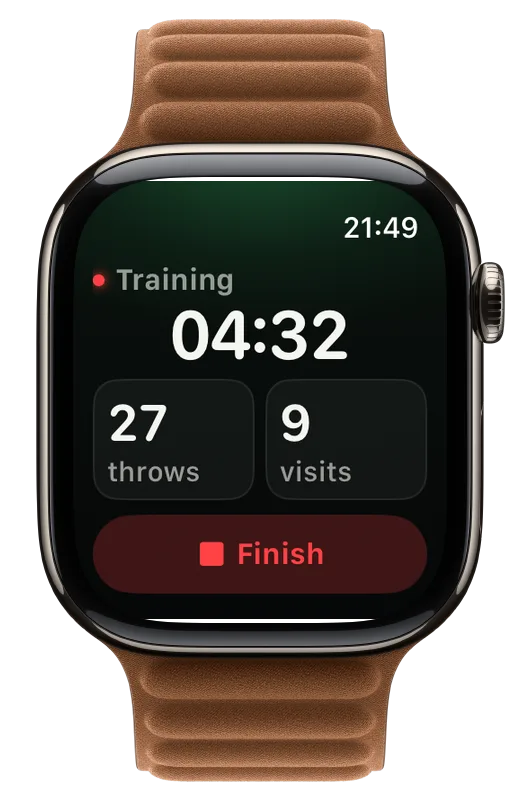
No tapping to count your darts. Your Apple Watch does the work.

  1. ThrowKit on Apple Watch while recording: session time, throws and visits

    Start a session

    Wear your Apple Watch on your throwing arm and tap Start.

  2. Throw naturally

    Free throwing, a guided drill or a match: play as you always do. ThrowKit counts your darts on its own.

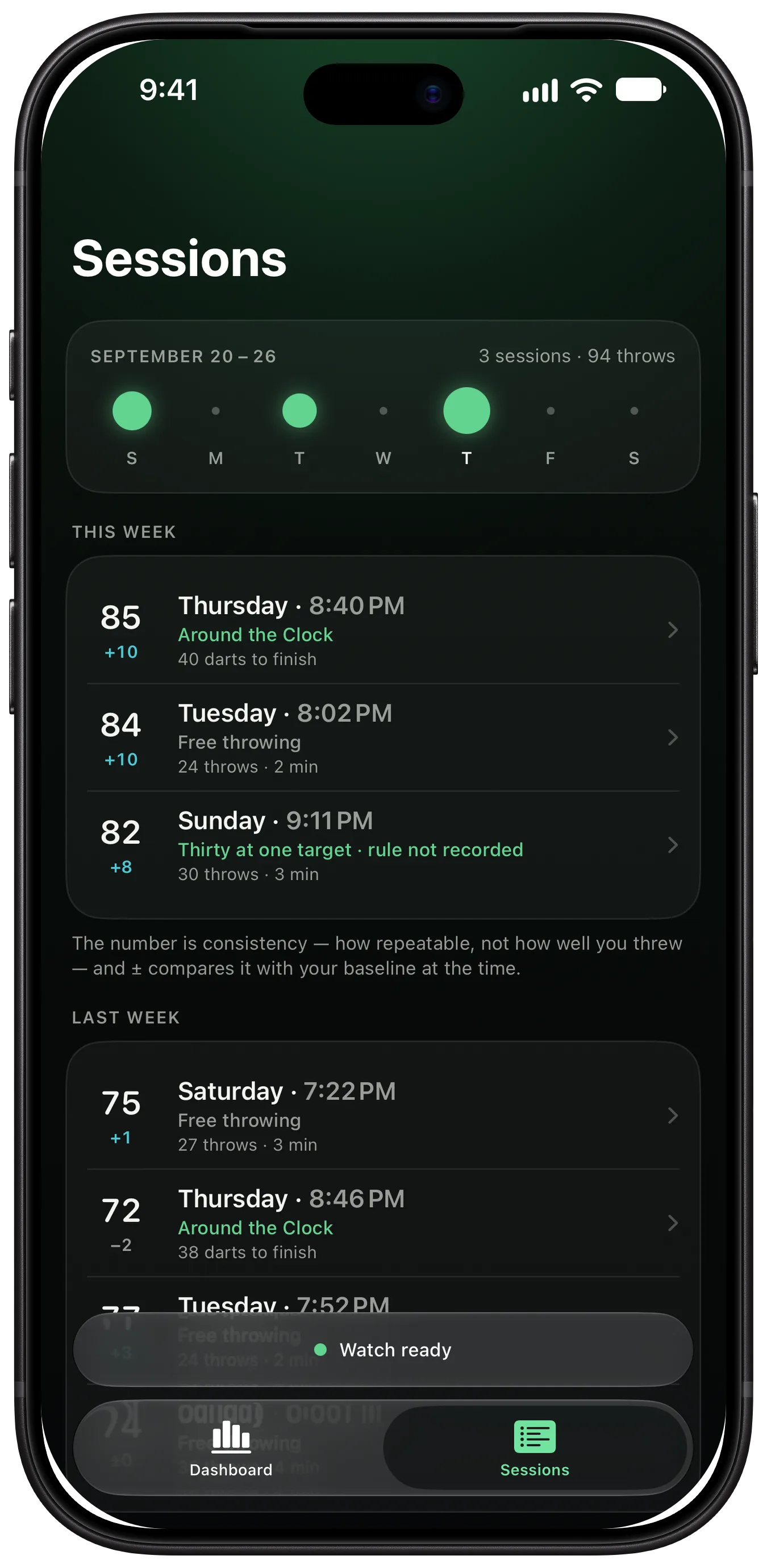
  3. The ThrowKit sessions list on iPhone, grouped by week, with each session’s consistency and drill

    See your analysis

    Finish the session and open your iPhone: your consistency, its five measures and every session, week by week.

Make an invisible motion visible.

A throw is over in a blink. ThrowKit measures every one and shows you how closely they repeat.

How consistent is your throw?

Every session gets a consistency score from 0 to 100. It tells you how repeatable your motion was – not how well you threw, and not where your darts landed. With ThrowKit Pro, the throw signature lays every throw of a session over the others.
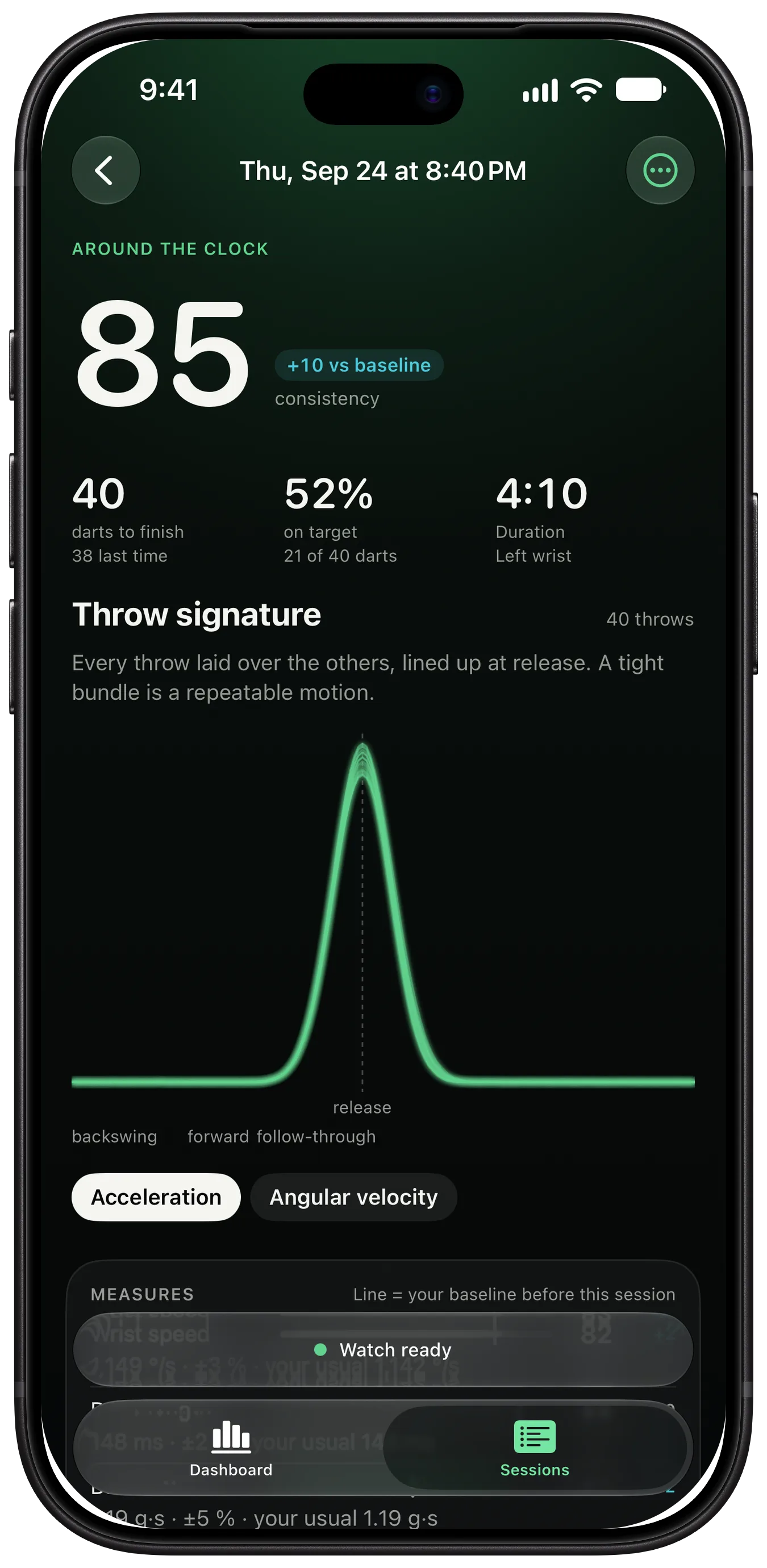
A ThrowKit session on iPhone: an Around the Clock run with its consistency, darts to finish and the throw signature, every throw laid over the others

Five measures for every throw

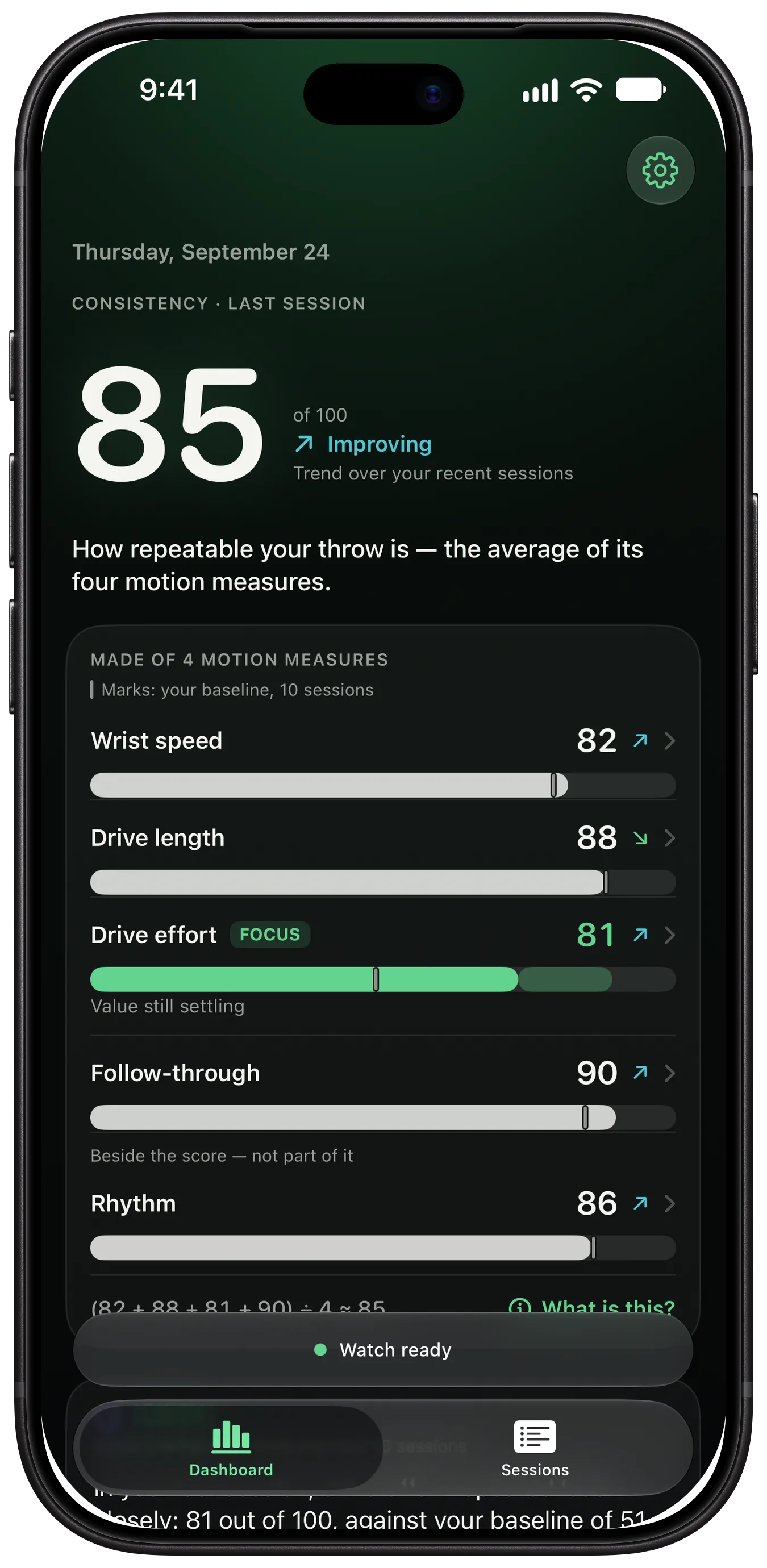
Wrist speed, drive length, drive effort and follow-through make up the score; rhythm, the time between your darts, sits beside it. Each shows its value and how closely it repeated, with or without a wind-up. No measure has a right end: faster or longer is not better.

Measures Consistency 85
  • Wrist speed 82
    1,149 °/s · ±3 %
  • Drive length 88
    148 ms · ±2 %
  • Drive effort 81
    1.19 g·s · ±5 %
  • Follow-through 90
    0.84 g·s · ±6 %

Beside the score — not part of it

  • Rhythm 86
    3.4 s · ±3 %

(82 + 88 + 81 + 90) ÷ 4 ≈ 85

You, compared with you

After a few sessions, ThrowKit knows your baseline on every measure, and trends show how your motion changes over the weeks. Baseline and trends are part of ThrowKit Pro.

The ThrowKit dashboard on iPhone: the consistency number, its trend and the five measures – wrist speed, drive length, drive effort, follow-through and rhythm

A coach that only talks about what it measured

After each session, Tonight names the measure that repeated least closely. With ThrowKit Pro you also get a drill to try – a suggestion, not a proven remedy – and a coach you can ask about your throw. With Apple Intelligence it writes its answers on your iPhone; without it, ThrowKit’s own rules answer the ready-made questions.

Coach

In your last session, drive effort repeated least closely: 81 out of 100, against your baseline of 84. Thirty at one target is the drill ThrowKit suggests for it. It is a suggestion, not a proven remedy: whether it changes your throwing, ThrowKit can’t say.

Drive effort · 81 Thirty at one target

Under the hood

Private by design

Your throw stays yours. Motion data and analysis stay on your Apple Watch and iPhone unless you export them or send them to ThrowKit yourself. With ThrowKit Pro, you can save your sessions to Apple Health as workouts. No account, no ads, no tracking.

Works offline

Practice in the basement or at the club. Recording and analysis never need an internet connection.

Built for Apple Watch

Made with Core Motion, SwiftUI and Apple Intelligence. It feels right at home on your wrist and your iPhone.

Questions

Which Apple Watch do I need?

An Apple Watch with watchOS 10 or later, paired with an iPhone on iOS 26 or later. Wear it on your throwing arm, left or right. The coach writes its own answers only on an iPhone with Apple Intelligence.

Does ThrowKit know where my dart landed?

No. ThrowKit measures the motion of your arm, not the board. Your consistency score says how repeatable your throw was, not how well you threw or your average. In guided drills you tap Hit on your Watch yourself.

Does it work in drills and matches?

Yes. Around the Clock, Thirty at one target and the Hundred-dart set run right on your Watch: it shows the target, and you tap Hit when your dart is in. For a match, pick Match on your Watch and tap Leg over after each leg. Matches stay out of your practice numbers; comparing the two is part of ThrowKit Pro.

Do I need an account?

No. There is nothing to sign up for. Your data stays on your iPhone and Apple Watch unless you export it or send it to ThrowKit. ThrowKit Pro is bought with your Apple Account.

Is it free?

Recording is free: every session with its consistency and five measures, guided drills and match mode, for your last 30 days. ThrowKit Pro adds your baseline and trends, the measure details and the throw signature, Tonight’s plan, the coach, Apple Health workouts, heart rate, match insights and your whole history. Pro costs €4.99 a month, €29.99 a year with a 14-day free trial, or €59.99 once; other countries pay the App Store’s local price. Nothing is deleted without Pro – older sessions are only locked.

Will it work with Autodarts or Scolia?

No. ThrowKit doesn’t connect to autoscoring systems. It measures your arm with your Apple Watch; in drills you tap your hits yourself.

Try it at your next practice.

ThrowKit is free on the App Store. Wear your Apple Watch on your throwing arm and throw as usual.

Download on the App Store Download on the App Store

Free · Requires Apple Watch